
Due to its responsive design, your startup website is judged in seconds. A visitor lands on your homepage, scans for three seconds, and decides whether to stay or leave. That snap judgment determines whether your product gets a fair shot.
A well-designed web design establishes your startup's credibility and drives future growth. Agencies will help you with this.
This checklist covers what matters before launch.
Purpose, Goals, and Success Metrics
Start with one clear statement: what problem you solve for your target audience, for whom, and why you're the better choice. Write it in one line and put it above the fold where every visitor sees it first. Use concise messaging to communicate your value proposition quickly and effectively.
Choose one primary action you want visitors to take: start a trial, request a demo, or join a waitlist. Pick one, not three. Add one secondary action for people who need more time: watch a video or learn more.
Tie every design choice to numbers. Signups, demo requests, qualified leads, or revenue from the site. Pick three to five tools or metrics you can track from day one. These numbers tell you if your site works.
Your goal: Anyone should read your hero section in five seconds and know what you do and what to do next.
Audience, Positioning, and Messaging
List your top two or three audience types. For each one, please write down the job they're trying to finish, what frustrates them, and what success looks like.
Match your strengths to their frustrations, incorporating social proof to enhance your credibility. Turn those matches into proof: social validation, case studies, precise results, or quick product demos.
Clear communication and consistent branding elements, such as your color scheme, logo, and tone of voice, help position your startup and play a key role in building trust with potential clients.
Color Wheel Illustration by Clay
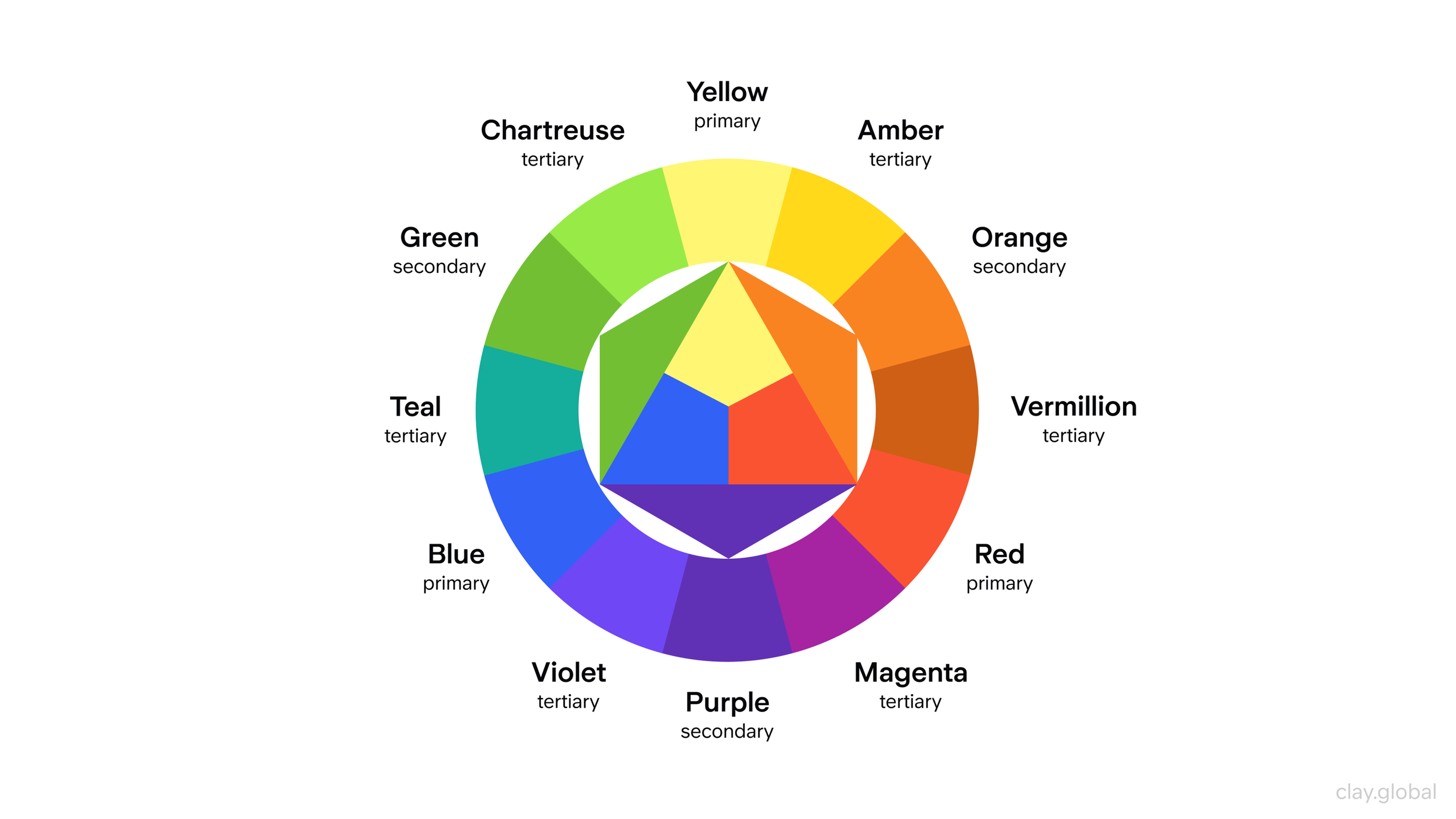
This approach ensures your website directly addresses the needs of potential clients and establishes credibility from the start.
Set one voice rule and follow it with clear calls to action. Confident but human works better than buzzword-heavy.
Test your copy with this filter: if a sentence could appear on any competitor's site, rewrite it. Unlike everyone else, your message should sound like you and be backed by social proof.
Brand System and Visual Foundations
You don't need a complete brand book to launch. You need clear rules, including obtaining an SSL certificate for security. Confirm your logo works in different sizes and spaces.
Showcasing logos of partner brands on your site can reinforce credibility and build trust with visitors. Lock in your color system primary and secondary colors, neutrals, and colors for states like errors or success.
Pick fonts that pair well and set fallback options. Define spacing between elements and decide how shadows work. The visual system should reflect your brand's concept and values. Choose one style for images or illustrations and stick to it.
Build a small component library: buttons, input fields, cards, badges, and alerts. These pieces keep your site looking consistent and trustworthy without slowing you down.
Scope and Information Architecture
Keep your site map tight. Home, Product or Features, Pricing, About, Resources like blog or docs, and Contact. Add Support or Status pages only if you need them. For each page, including your landing pages, write the top three questions it must answer.
Keep navigation simple with labels people understand immediately. Easy navigation is crucial for user experience and retention, helping visitors find what they need quickly and building trust in your site. Define your URL patterns early and make them readable. If a page has no unique goal or audience, fold it into another page.
Resist the urge to add pages. More pages mean more maintenance, more confusion, and slower decisions.
Content Strategy and Writing
Content is your product's voice. Outline each page before you design anything. Give each section one purpose and one call to action. Write headlines that work when someone scans fast and body text they trust when they slow down. Make sure to clearly communicate your offer and the services your startup provides so visitors immediately understand the value you deliver.
11 Types of Website Content by Clay
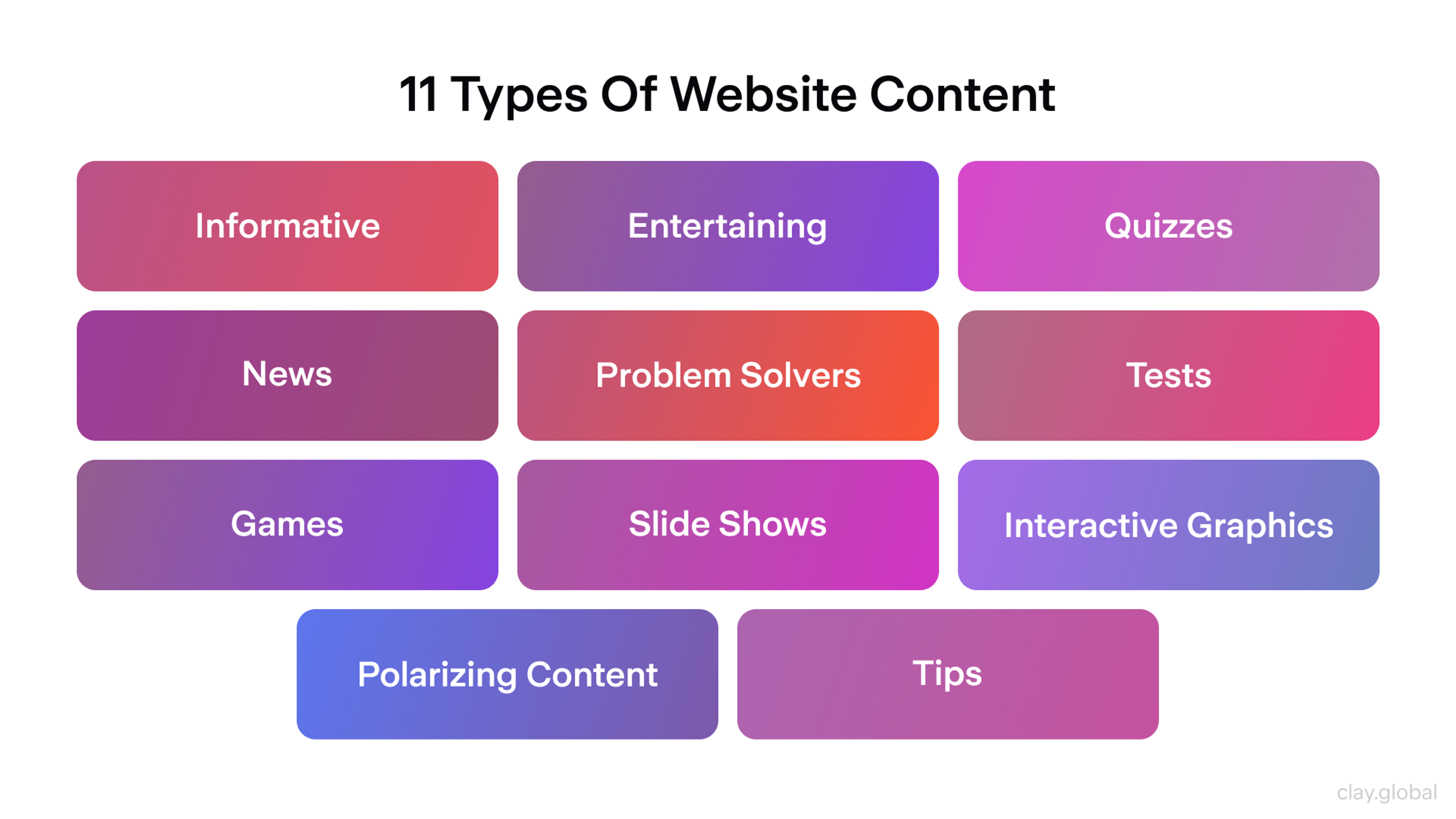
Use real examples, real numbers, and real screenshots. Vague promises lose to specific proof every time. Showcase these examples effectively to build credibility and help visitors see how your solutions work. Write your privacy policy, terms, refund policy, and security details now. Legal pages build trust when done well.
Set up your content system with the right fields: page titles, meta descriptions, social sharing tags, hero text, feature lists, and testimonial sections. Don't hard-code your offers or content into your design. You'll regret it later.
UX/UI Design System
Design for mobile first, then scale up for larger screens using modern design principles. Define how buttons and inputs behave - hover, focus, disabled, and loading states.
Plan empty states for dashboards and success or error messages for forms. An intuitive interface ensures users can easily navigate and interact with your site, making complex tasks straightforward.
Use small interactions to confirm actions without slowing people down. Incorporate interactive elements and subtle animations, such as micro animations or scroll-triggered effects, to enhance engagement without sacrificing performance. Keep forms short. Every extra field costs conversions.
Check accessibility while you design. Make sure colors contrast enough. Ensure focus rings show up clearly. Underline links and use readable font sizes. Fixing these issues later takes more work.
Accessibility Baseline
Accessibility isn't optional. It improves your rankings and conversions while reaching a wider world of potential customers. It improves your rankings and conversions while opening your product to more people. Make sure keyboard navigation works everywhere: menus, modals, and forms.
Set a logical order for focus and make focus outlines visible. Write alt text for images that carry meaning. Mark decorative images so screen readers skip them. Label inputs properly and connect error messages to the right fields.
Use headings in order: H1, then H2, then H3. Don't use color alone to show meaning. Add text or icons too.
Accessibility Elements by Clay

SEO and Discoverability
Technical setup comes before content work, especially if you plan to attract investors. Give every page a unique title and meta description. Create an XML sitemap and a robots.txt file that allows important pages through.
Use canonical tags to prevent duplicate content issues. Search engine optimization is essential for increasing your website's visibility, driving traffic, and supporting your digital marketing goals.
Add structured data where it helps: organization details, product information, or FAQ markup. Link between related pages with clear anchor text. Use external links strategically to connect visitors to valuable resources, platforms, or tools that support your e-commerce or online store development. Plan redirects for anything that might change URLs later.
For content, map five to ten core keywords to your pages based on what people search for. Write for humans first. Keywords follow naturally when your content helps.
Finally, discover more resources and a collection of examples to inspire your web design, branding, and SEO strategies.
SEO Strategy by Clay
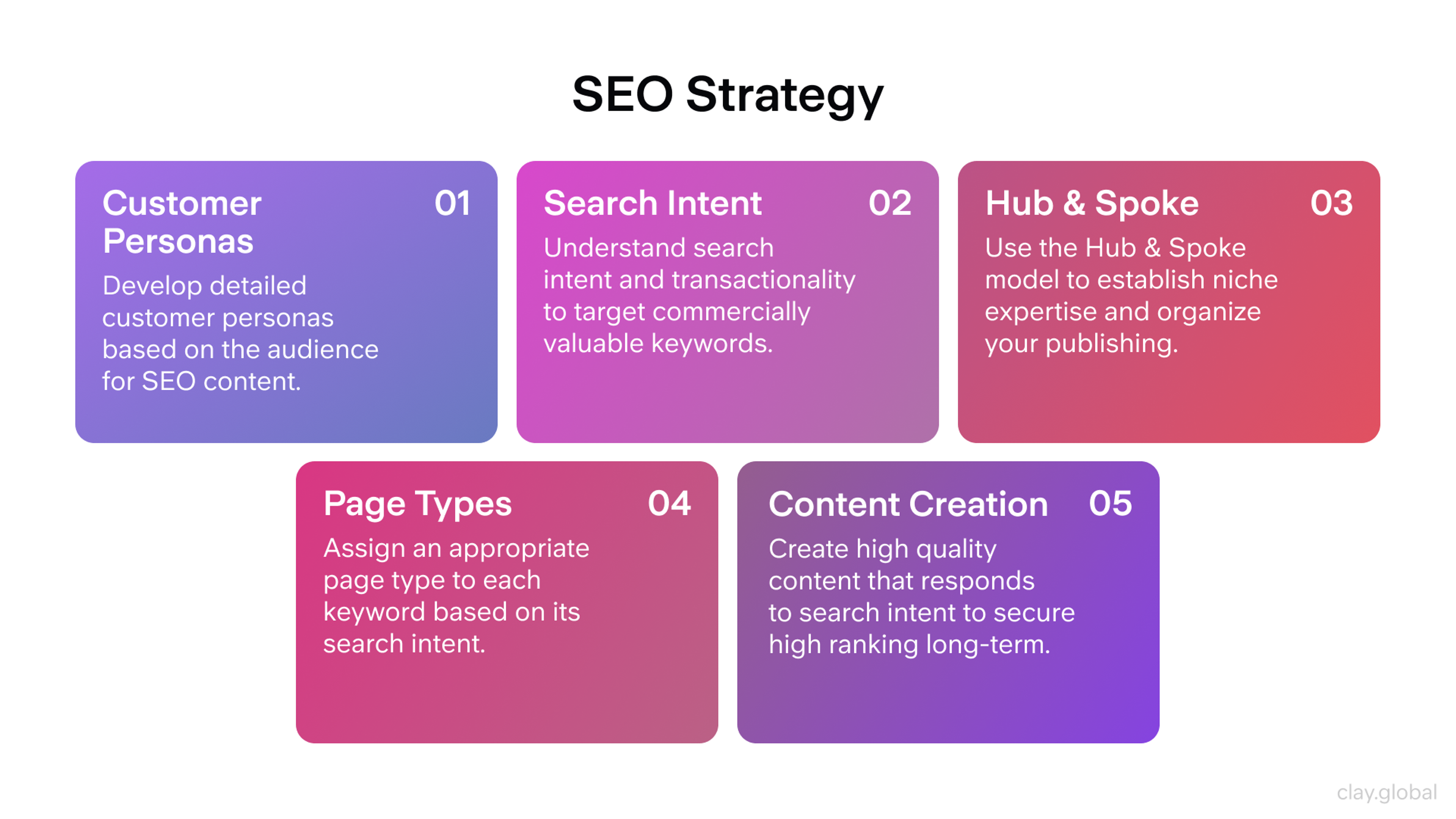
Performance and Core Web Vitals
Slow e-commerce sites lose money. Set these targets: Largest Contentful Paint under 2.5 seconds, Interaction to Next Paint under 200 milliseconds, and Cumulative Layout Shift under 0.1. Test on real devices, not just fast laptops.
Optimize images with modern formats and proper sizes. Load web design fonts carefully - use system fonts or a small web font set with font-display swap. Push non-critical scripts to load later.
Review every third-party script. Each one slows your site. Don't pay with speed if you wouldn't pay cash for a script. Use a content delivery network and caching headers. Inline only the CSS needed for content above the fold.
Integrations and Data
Install analytics with a clear event plan. Track page views, CTA clicks, form submissions, pricing interactions, and documentation searches. Set up cookie consent properly and respect user choices.
Connect your CRM or lead system to forms. Double-check that field mapping works. Integrate your website with the right platform to streamline data and user management. Test chat or help widgets for performance impact and mobile visibility. Set up email collection with a welcome series ready.
If you sell or sell anything to investors, test payments and refunds completely before launch. Ensure the purchase process is smooth and reliable for users.
Track less, but track better. Make every valuable event a real decision.
Security, Privacy, and Compliance
Force HTTPS and enable HTTP Strict Transport Security. Set security headers: Content Security Policy, X-Frame-Options, X-Content-Type-Options, and Referrer Policy. Keep secrets out of your code.
Limit who has admin access and require multi-factor authentication. Verifying user identities and data integrity is essential to maintaining security and building trust with your users.
Write a clear privacy policy and cookie policy. Define how long you keep form data and how users delete it. Set up backups and make sure you can restore them.
If you collect personal data, document your legal basis and consent flows. Treat staging and production environments with the same security standards.
Tech Stack, Hosting, and Delivery
Pick a stack your team can maintain. Create separate environments for development, aesthetics, staging, and production. Use continuous integration and deployment to ship small, reversible changes. The right tech stack supports your company's growth and ensures your project can scale efficiently.
Add uptime monitoring, error tracking, and logs you actually check. Prepare a rollback plan that works in minutes, not hours.
The best stack is the one you can own with the team you have. Successful companies manage their projects with reliable, maintainable stacks to ensure long-term stability and growth.
QA and Launch Rehearsal
Build a test matrix that matches your audience's devices and browsers. Test on real phones, not just simulators. Click every navigation link. Validate every form, error message, and email confirmation.
Check your 404 and 500 pages. Run a link checker and audit image alt text. Proofread everything, including meta tags and social sharing tags. Confirm analytics fires once per event, not multiple times.
Practice a full demo-to-signup flow on staging before going live. Thorough testing is essential before launching your website to ensure a smooth debut and avoid critical issues.
Pre-launch snapshot:
- All pages indexed correctly, sitemap submitted
- Titles and meta are unique, and social images render properly
- Forms submit data to CRM, and autoresponders send
- Performance hits targets on mobile
- Accessibility keyboard test passes for main flows
- Backups, monitoring, and error tracking are active
Go-Live and Post-Launch
On launch day, freeze new changes. Clear caches, warm up key pages, and flip DNS with a short time-to-live setting. Conduct smoke tests on the live site to explore the homepage, pricing, signup, contact, and any payment flow.
Announce your launch on prepared channels - newsletter, social media, founder post, and partner mentions, including an engaging video. Focus on creating ongoing user value by continuously improving your website and user experience.
In your first week, observe real user data and fix minor issues quickly. Run usability sessions with five people in week two and ship improvements daily.
In your first 30, 60, and 90 days, double down on what works. Publish one deep article aligned with your product. Add a case study with real results. Use these to highlight your unique offering and how it benefits your customers. Test your primary CTA with slight variations.
Your website is key to reaching and engaging with the world, helping your brand connect with a global audience.
A Lightweight Definition of Done
Copy this checklist for startup websites. It tells you when you're ready:
- Anyone can understand what you do in five seconds
- The primary call to action stands out on desktop and mobile
- Page speed meets your targets on a real phone
- Forms work and send data where it should go
- Accessibility checks pass for your top three user flows
- Analytics events are clean, unique, and visible on your dashboard
- You have plans for improvements on day one, week one, and month one
Read more:
FAQs
How Long Does It Take to Launch a Startup Website?
Plan for four to eight weeks from start to launch. A website design project typically begins with pre-design considerations, establishing foundational elements, and aligning with the client before development starts.
Week one covers strategy, messaging, and structure. Weeks two and three focus on design and content. Week four handles development and integration. The final weeks go to testing, fixes, and launch prep. Good planning shortens the timeline. Poor planning stretches it.
What's the Most Essential Element for a Startup Website?
Your value proposition. Nothing else matters if visitors don't understand what you do and why it matters in five seconds. Clear messaging helps attract and inform potential clients. Put your clearest message above the fold with an obvious action to take. Everything else supports this foundation.
Do I Really Need Accessibility on Day One?
Yes. Accessibility improves your search rankings and conversion rates while reaching more potential customers. It's easier to build it in from the start than retrofit it later. Keyboard navigation, proper labels, and color contrast take minimal extra effort when planned from the beginning.
How Many Pages Should a Startup Website Have at Launch?
Five to seven pages work for most startups. You need a home page, product or features page, pricing page, about page, and contact page. Add a resource section if you're publishing content. Add a support or status page only if it serves a clear need. More pages mean more maintenance without a guaranteed return.
Conclusion
Your site will be judged in seconds - make those seconds count. Use this checklist to launch a clear, fast, accessible website that tells people what you do and gives them one obvious next step. Tie every choice to metrics, test on real devices, and keep security and privacy non-negotiable. Then treat launch as the beginning: watch real-user data, fix friction fast, and ship small improvements every week.


About Clay
Clay is a UI/UX design & branding agency in San Francisco. We team up with startups and leading brands to create transformative digital experience. Clients: Facebook, Slack, Google, Amazon, Credit Karma, Zenefits, etc.
Learn moreAbout Clay
Clay is a UI/UX design & branding agency in San Francisco. We team up with startups and leading brands to create transformative digital experience. Clients: Facebook, Slack, Google, Amazon, Credit Karma, Zenefits, etc.
Learn more