Growing a web development team sounds like a good problem to have. More projects, more clients, more ideas. But here’s what actually happens: work slows down, quality drops, and your best people burn out.
What separates teams that grow well from those that fall apart? It’s not talent or tools. It’s having a project manager that ensures a clear system connects design skills with technical execution, user research, and business strategy.
Project management — the process of planning, organizing, and overseeing the team's work — is essential for aligning design, techniаcal execution, and business goals. First, let’s remember what a web designer does.
What Does a Web Designer Do by Clay

This article shows you five steps to scale your responsive web design team without losing quality or speed. You’ll learn to define success in business terms, create specialized roles that work together, build technical partnership processes, establish research and testing habits, and measure what matters across design, development, and user experience.
Step 1: Define Success and Create Service Products
Most teams struggle because every web design project feels different and technical requirements surprise them late in the process. One day it’s a landing page. The next day it’s a complete redesign.
As part of the web design team's responsibilities, it's important to evaluate and improve the current website to enhance performance and modernize the design. Then someone needs “quick” changes to components, but they break the website code.
Success starts when project requirements connect design to business results and technical realities. Then you turn what you deliver into clear service products that account for both user experience and technical requirements.
Connect Design to Business Goals and Technical Quality
Before you hire anyone or work closely with new tools, answer this question: What business outcomes must influence design in the next 6 to 12 months, and what technical standards must you maintain?
For marketing website teams, business outcomes usually include user engagement, converting visitors to leads or signups, revenue influenced by design changes, cost to get each new customer, and brand consistency that builds trust.
Technical quality metrics matter equally. Web accessibility compliance ensures everyone can use your site. Page speed performance affects both user experience and search rankings. Monitoring and improving search engine rankings is a key metric to help you outperform competitors and achieve top positions in your industry.
Cross-browser compatibility means your site works everywhere. Mobile responsiveness adapts to all device sizes. Security and proper HTML structure protect users and improve search results.
Cross Browser Compatibility

You’ll also want to watch how your team operates. Track time from request to launch, how much work you finish each week, how often technical debt creates rework, and whether you hit deadlines across design and development.
Turn Your Services Into Products That Include Technical Specifications
Once you know what outcomes matter, define services that move those outcomes while maintaining technical standards. Think of each service as a product with standard scope, inputs, technical requirements, and delivery timeline.
Common integrated services include marketing website pages, campaign landing pages, design system work, quality assurance engineers, conversion testing, accessibility audits, user experience research, content strategy development, and web content management and creation to support website structure and user engagement.
Marketing website pages include user research analysis, information structure planning, content design, visual design, accessibility review, front-end development specifications, performance optimization plan, and developer handoff with component references.
Campaign landing pages focus on fast cycles with A/B testing setup, strong analytics focus, conversion focused copy and visuals, mobile first responsive implementation, and Core Web Vitals optimization.
Design system work covers component updates with technical specifications, style token management, documentation updates, cross-platform compatibility testing, and version control integration.
For each service, document the problem it solves, technical requirements, team members involved, what you need to start, definition of done including technical acceptance criteria, typical timeline, and effort estimate.
Make Requests Include Technical Context
Create one intake path that captures both design and technical requirements. Include business goal and success metrics, target audience and user research insights, traffic source and expected volume, technical constraints like content management systems and frameworks, browser and device requirements, accessibility requirements, SEO and semantic requirements, integration needs for analytics and third-party tools, and timeline and dependencies.
It is crucial to thoroughly understand and document the client's requirements to ensure the final product aligns with their specific needs and expectations.
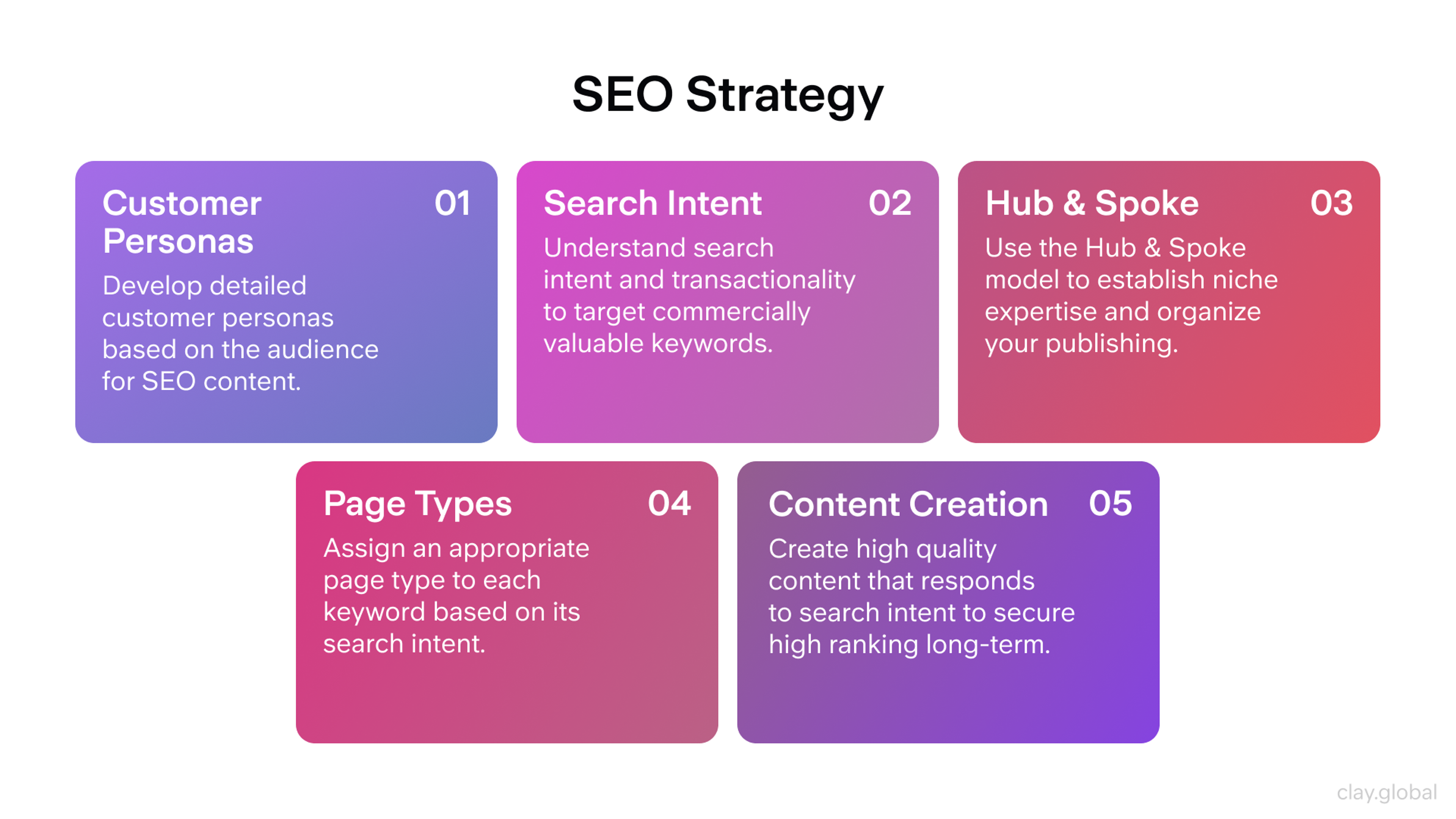
SEO Strategy by Clay
Each week, the design lead and technical lead review requests using Impact times Effort times Technical Risk scoring. If technical feasibility is unclear, require a brief technical discovery before work begins.
Step 2: Build Specialized Roles and Cross-Functional Collaboration
A team that scales well isn’t just talented in-house designers. Its specialized roles cover the full spectrum of modern web design: user experience research, information architecture, visual design, technical implementation, accessibility, and performance optimization. A web design agency typically brings together these specialized roles to deliver comprehensive and custom website solutions for clients.
Structure for Expertise, Not Just Size
A healthy, growing web design team includes these specialized roles.
- Design Lead or Manager — owns outcomes, coaches the team, coordinates with product and engineering, manages technical integration.
- UX Researchers — run interviews and usability tests, analyze analytics, build personas and journeys, deliver insights for decisions.
- Information Architects — shape content organization and navigation, optimize user flows, develop taxonomy and content strategy frameworks.
- UX/UI Designers — create user flows and wireframes, design interactions, keep decisions user-centered.
- Visual/Brand Designers — maintain brand consistency, craft typography systems, apply color theory, tell stories visually.
Fonts Example

- Content Strategists / UX Writers — set voice and tone, clarify messaging and hierarchy, refine microcopy, plan content management.
- When the team reaches 6–8 people, add:
- Design Operations Manager — manages intake, capacity, tooling, and the design system.
- Accessibility Specialist — keeps products compliant, runs audits, trains the team.
- Performance Specialist — improves speed, tracks Core Web Vitals, informs technical choices.
Also, build two close partnerships: collaborate with Front-End to check feasibility, uphold code quality, and fit your framework; and with QA to test across browsers and devices, validate accessibility, and monitor performance.
Define Technical Collaboration Processes
The handoff between design and development determines project success. Replace “here’s the Figma link” with systematic technical collaboration. Project management tools such as Asana or Trello facilitate collaboration, track tasks, and ensure timely project delivery.
Design Development Sync involves weekly meetings where designers and developers review upcoming work, discuss technical constraints, identify component needs, and plan implementation approaches.
Technical Design Reviews happen before major design decisions. Include front end developers to assess feasibility, performance implications, accessibility considerations, and framework compatibility.
Component Partnership pairs designers and developers to create, update, and maintain design system components. Both roles contribute to component definition, implementation, and documentation.
Quality Integration includes accessibility and performance specialists in design reviews, not just final QA. Early involvement prevents expensive retrofitting.
Keep Meetings Focused on Cross-Functional Outcomes
Teams need regular time to align across disciplines. A clear communication framework — choosing when to use asynchronous vs. synchronous tools — keeps collaboration smooth and decisions timely.
- Weekly planning. Review new requests, confirm technical feasibility, balance capacity across disciplines, set realistic goals, and surface cross-functional dependencies early.
- Biweekly design–development reviews. Present designs with technical context, gather feedback on the implementation approach, decide on trade-offs, and ensure accessibility and performance are addressed.
- Monthly retrospectives. Improve cross-functional processes, manage technical debt, track accessibility and performance trends, assess tool effectiveness, and plan skill development.
- Quarterly technical strategy reviews. Revisit framework choices, design-system architecture, accessibility maturity, performance opportunities, and adoption of relevant emerging technologies.
Establish clear owners and capture decisions after each session so this cadence translates into focused priorities and predictable delivery.
Step 3: Hire for Specialized Skills and Technical Collaboration
Hiring great individual designers is different from building a team that performs well across disciplines. You need people who excel in specific areas while collaborating effectively across design, research, content, and technical implementation. Selecting the right team members with the appropriate skills and balance is essential to ensure project success.
Use Role-Specific Scorecards
Write detailed scorecards for each specialized role before posting jobs. For UX researchers, evaluate research methodology, synthesis skills, stakeholder communication, and technical analysis abilities. For accessibility specialists, assess knowledge of accessibility guidelines, testing methodology, remediation planning, and developer collaboration.
UX Researcher Role

Rate candidates on specific skills with observable behaviors. A good understanding of project requirements, roles, and processes is essential for effective leadership and quality assurance. UX Research Skills include designing unbiased studies, synthesizing insights effectively, communicating findings to technical teams, and connecting research to design decisions.
Technical Design Skills mean understanding web development constraints, collaborating with back-end developers designing within framework limitations, considering performance implications, and creating implementable specifications.
Accessibility Expertise involves knowing accessibility guidelines deeply, conducting comprehensive audits, providing practical remediation guidance, and integrating accessibility into design processes.
Information Architecture includes organizing complex content logically, designing intuitive navigation, creating scalable taxonomy systems, and considering SEO and technical implications.
Cross Functional Collaboration means communicating effectively with developers, integrating feedback from multiple disciplines, adapting designs based on technical constraints, and contributing to team processes.
Test Real-World Cross-Functional Skills
Design practical exercises that mirror actual work. For UX researchers, provide analytics data and ask them to design a research plan that would guide design decisions. For visual designers, give them an existing component and ask them to propose improvements that maintain technical consistency. Emphasize the importance of collaborating with other team members during these exercises to ensure successful project outcomes.
Include technical context in design exercises. Give candidates a brief with specific framework limitations, performance requirements, or accessibility constraints. You want to see how they adapt creative solutions to technical realities.
For senior roles, include stakeholder communication scenarios. Present a situation where research findings conflict with business preferences, or where accessibility requirements challenge visual design goals. Assess how they navigate cross functional discussions.
Onboard Into Integrated Workflows
A good hire without proper integration into cross functional workflows becomes isolated and ineffective. It is crucial to integrate new hires into the new team structure to ensure successful collaboration and project outcomes. Use specialized 30/60/90 plans.
30-60-90 Day Plan
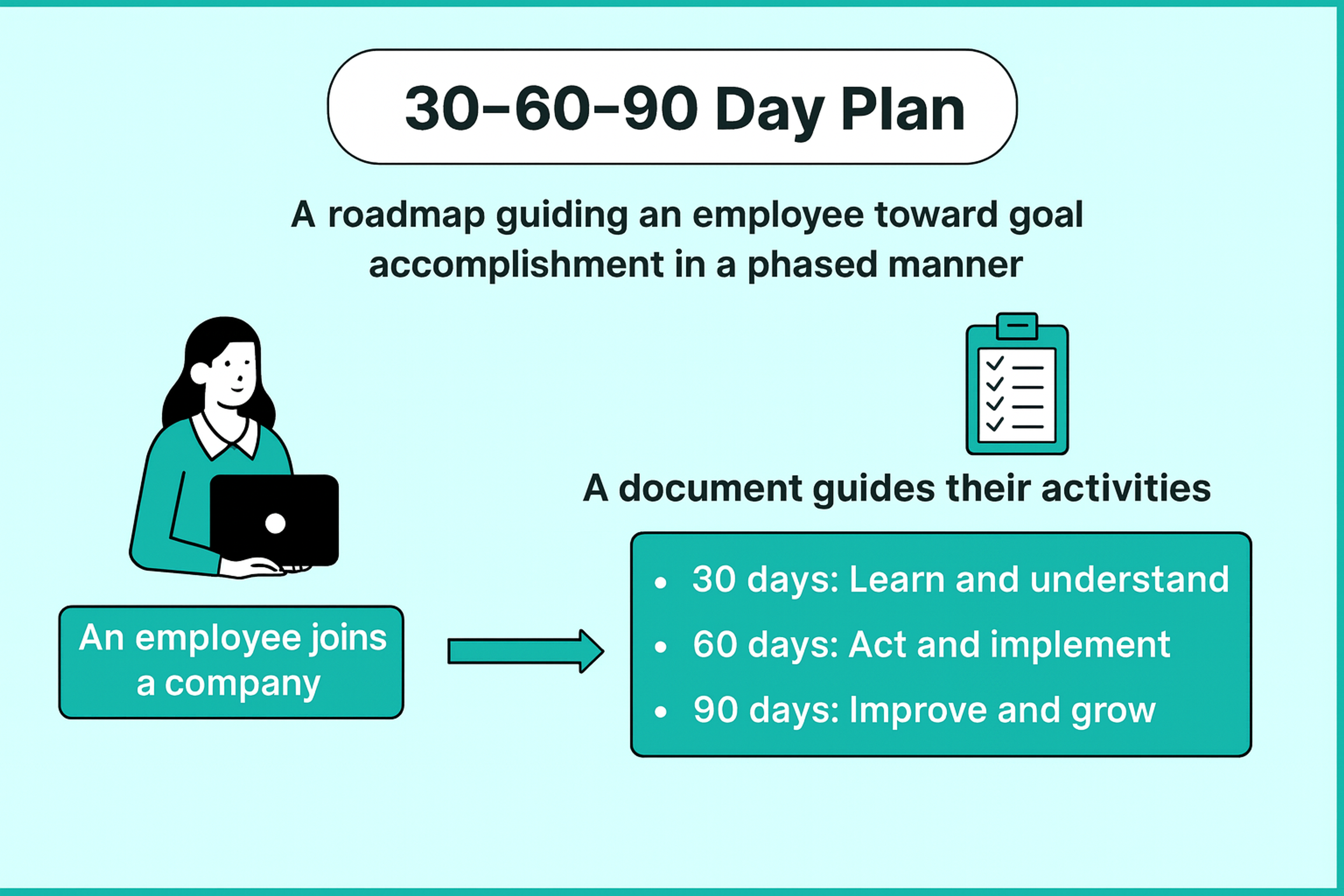
The first 30 days include shadowing cross functional meetings, completing one small project that touches multiple disciplines, touring the technical infrastructure and design system, and pairing with team members from other specializations.
By day 60, own a project that requires collaboration with developers, present findings or designs to stakeholders, contribute to process improvements, and identify integration opportunities.
By day 90, lead a cross functional initiative, mentor another team member, propose improvements to technical workflows, and demonstrate deep integration with team processes.
Step 4: Create Quality Standards That Include Technical Excellence
Quality at scale requires consistent processes that account for user experience, visual design, technical implementation, accessibility, and performance. Following a structured development process — covering all stages from research and planning to review, edits, and final launch — ensures a cohesive and organized project. The more predictable the quality path, the easier it becomes to maintain standards as you grow.
Start With a Complete Definition of Ready
A brief isn’t just scope. It’s the technical and user experience contract for success. Require these elements before work begins.
Your brief must cover the essentials. State business goals and success metrics. Include research findings and target personas. List technical needs and accessibility requirements. Set performance budgets and Core Web Vitals targets. Define SEO needs and semantic structure. Outline content strategy, information architecture, and site architecture.
Specify supported browsers and devices. Note analytics and CMS integrations. Add a timeline with clear checkpoints. If anything is missing, the brief isn’t ready. Gaps now lead to costly rework later.
Conduct a Discovery That Includes a Technical Assessment
Discovery isn’t just user research and competitive analysis. It also includes insights into how the web app functions, including technical discovery for significant projects.
User Experience Discovery reviews analytics for user behavior patterns, interviews users about pain points, maps current user journeys, and identifies usability issues through testing.
Technical Discovery audits current code quality, assesses framework constraints, identifies performance bottlenecks, reviews the technical aspects of the project — including code quality, framework constraints, and performance bottlenecks — reviews accessibility compliance, and evaluates SEO optimization opportunities.
Content Discovery analyzes content organization and hierarchy, identifies content gaps, assesses content management workflows, and plans information architecture improvements.
This integrated discovery provides the foundation for designs that are both user centered and technically excellent.
Execute With Standards That Scale Across Disciplines
- Design standards. Use design-system components and tokens consistently. Follow brand guidelines and the approved color palette. Stick to established interaction patterns. Design mobile-first and make layouts responsive. Plan for multiple devices and contexts.
- Technical standards. Write semantic HTML. Support full keyboard navigation. Meet color-contrast ratios. Optimize for Core Web Vitals. Follow security best practices. Integrate cleanly with your CMS.
- Accessibility standards. Design for inclusion from the start. Test with screen readers and other assistive tech. Provide more than one path to content. Ensure keyboard navigation works everywhere. Validate color contrast and visible focus states.
Review With Technical and Accessibility Integration
Effective review processes bring multiple perspectives and clear decision-making authority.
- Peer design reviews: check visual consistency, component usage, brand alignment, interaction patterns, and responsive behavior. Involve senior or award-winning designers to raise the bar.
- Technical feasibility reviews: assess implementation complexity, framework fit, performance impact, accessibility risks, and browser support.
- Accessibility reviews: test keyboard navigation, validate color contrast, confirm semantic structure, verify screen-reader compatibility, and ensure WCAG compliance.
- Content reviews: validate information hierarchy, clarity, SEO basics, and consistent voice and tone.
Document decisions and technical requirements. Future team members need context for implementation choices and accessibility decisions.
Close the Loop With Comprehensive Measurement
Complete handoff packages include:
- Design specs: annotated designs with interaction details; component references linked to the design system.
- Technical specs: implementation notes for developers.
- Accessibility: requirements and a testing checklist.
- Performance: optimization guidelines.
- Content & SEO: content guidelines and SEO requirements.
- Analytics: implementation plan with success metrics.
Schedule post launch reviews that examine user experience metrics, technical performance, accessibility compliance, and business outcomes. Ensure the final deliverable is a custom website tailored to the client's specific requirements and goals. Log learnings that improve future projects across all disciplines.
Step 5: Measure Success Across All Disciplines and Continuously Improve
Scaling a new site requires measurement that spans user experience, technical quality, accessibility compliance, and business outcomes. A website is a crucial part of a business's online presence, promoting brand image and converting visitors into customers. Track the work, manage technical and design debt systematically, and evolve the organization to support increasing complexity.
Track Integrated Success Metrics
Monitor performance across user experience, technical quality, business outcomes, and operations.
- User experience metrics. Track task completion rate, user satisfaction, usability test findings, journey completion, and content engagement to surface friction and prioritize UX fixes.
UX Metrics

- Technical quality metrics. Monitor Core Web Vitals, accessibility conformance (WCAG), cross-browser compatibility, mobile performance, security audit results, semantic HTML, and overall SEO health. Regular SEO monitoring improves visibility and rankings.
- Business outcome metrics. Measure conversion lift, revenue influenced by design changes, shifts in customer acquisition cost (CAC), brand perception, and stakeholder satisfaction to tie design to impact.
- Operational efficiency metrics. Watch design-to-development handoff time, rework due to technical issues, time to discover/fix accessibility issues, and the effectiveness of cross-functional collaboration to spot process bottlenecks.
Manage Design System and Technical Debt as Products
Prevent scale problems by treating your design system and technical infrastructure as products requiring ongoing investment.
Design System Product Management includes quarterly component audits, usage analytics review, deprecation planning, new pattern proposals, and cross platform consistency evaluation.
Technical Debt Management involves regular code quality reviews, framework update planning, accessibility debt remediation, performance optimization initiatives, and security update protocols.
Documentation as Code keeps design system documentation, accessibility guidelines, and technical standards current with version control, automated testing, and regular review cycles.
Cross Functional Governance includes designers, developers, accessibility specialists, and content strategists in system decisions. A well-defined web development team structure is essential to ensure efficient workflow and high-quality output. Use semantic versioning for changes that affect multiple disciplines.
Build Research and Testing Into Regular Workflows
Embed user research and testing throughout design and development cycles.
- Continuous user research. Conduct regular interviews and usability sessions, review analytics, update personas, and refresh journey maps.
- Integrated testing protocols. Include accessibility checks during design, performance testing during development, pre-launch usability testing, and post-launch monitoring with iterative improvements.
- Research-driven decision making. Use findings to guide technical architecture, accessibility priorities, content strategy, and design system evolution.
- Cross-functional learning. Share findings with engineering, include technical team members in user tests, and feed user feedback into the technical roadmap.
This approach ensures research and testing directly inform the final product.
What Is a Workflow

Know When to Evolve the Organization
Specific problems signal when to adjust team structure and processes.
If technical integration consistently creates bottlenecks, add dedicated technical design roles or strengthen design development partnerships.
Effective communication is a key characteristic of a great team, as it fosters collaboration, trust, and timely task completion. Ensuring your team communicates well — using both asynchronous and synchronous tools — can help address many structural and process challenges.
If accessibility issues are discovered late, integrate accessibility specialists earlier in design processes and provide team wide accessibility training.
If user research insights don’t reach technical decisions, create formal research sharing processes and include researchers in technical planning.
If design system adoption is inconsistent, strengthen design system governance and provide implementation support for developers.
If performance optimization for a new website is an afterthought, add performance specialists and integrate performance considerations into design processes.
Common Mistakes and How to Avoid Them
Hiring generalists instead of building specialized expertise happens when you expect every designer to be a user researcher, visual expert, accessibility specialist, and technical partner. Quality becomes inconsistent and burnout guaranteed.
Not all agencies are created equal — it's important to choose a partner with superior skills, modern tools, and effective strategies, since agencies are not created equal. Build complementary specializations with collaboration skills.
Treating technical integration as a handoff instead of partnership occurs when design and development work in isolation until “handoff.” Problems compounds and solutions become expensive. Integrate technical considerations into design processes from the beginning.
Deferring accessibility and performance to post launch creates expensive debt when teams treat accessibility compliance and performance optimization as technical afterthoughts. Build both into design standards and definition of done.
Conducting user research in isolation from technical decisions means research insights don’t reach technical planning and architecture decisions, so you optimize for outdated user needs. Include user research findings in technical roadmap planning.
Scaling design without scaling supporting disciplines happens when you add more visual designers without corresponding investment in user research, accessibility, content strategy, and technical partnership. This creates imbalanced teams that produce beautiful but ineffective work.
Your Next Three Months
Roll this out over three months.
In month 1, set the foundation and define roles. Establish baseline UX, technical, and business metrics. Define your services, build the intake, and start weekly planning.
In month 2, integrate processes. Add technical reviews and include accessibility in design reviews. Use clear definitions of Ready and Done, strong handoffs, and regular research and testing.
In month 3, focus on quality and measurement. Launch a shared dashboard and formal design system governance. Share research, run retros, and plan next quarter changes. After three months, you have a scalable system that ships fast and stays high quality.
Take Action This Week
Scaling a web design team requires integrating user research, design excellence, content strategy, accessibility expertise, and technical implementation into one coordinated system. The five steps in this guide create that integration systematically.
Choose one upcoming project and run it through the complete integrated process: cross functional intake brief, technical feasibility review, accessibility integration, user research validation, comprehensive handoff, and multi disciplinary post launch review.
Experience how integrated expertise creates better outcomes than individual excellence in isolation. Then make integration the standard operating procedure for your growing team.
FAQ
What Is A Web Development Team?
A web development team is a group of professionals who design, build, and maintain websites or web applications. It usually includes front-end developers, back-end developers, UX/UI designers, and project managers working together to deliver a functional and user-friendly product.
What Are The Three Main Roles Of Web Developers?
The three main roles of web developers are:
1.
Front-end developers – build the user interface and visuals2.
Back-end developers – manage servers, databases, and application logic3.
Full-stack developers – handle both front-end and back-end tasks
What Does The Web Development Department Do?
The web development department is responsible for building, testing, and maintaining websites or applications. They ensure the site runs smoothly, is secure, optimized for performance, and meets business and user needs.
Is Web Dev A Stressful Job?
Web development can be stressful due to tight deadlines, evolving technologies, and problem-solving under pressure. However, many developers find it rewarding because it offers creativity, high demand, and career growth opportunities.
What Are The Three Types Of Web Developers?
The three types of web developers are front-end, back-end, and full-stack developers. Front-end developers work on the user-facing side, back-end developers focus on server-side logic, and full-stack developers cover both.
Read more:
Conclusion
Scaling a web design team isn’t about adding people. It’s about a shared system that links research, design, content, accessibility, and engineering to clear business results. Use the five steps to set standards, define roles, and build strong partnerships. Track the right metrics and fix risks early. Apply the full process to one project, learn fast, and make integration your default.


About Clay
Clay is a UI/UX design & branding agency in San Francisco. We team up with startups and leading brands to create transformative digital experience. Clients: Facebook, Slack, Google, Amazon, Credit Karma, Zenefits, etc.
Learn moreAbout Clay
Clay is a UI/UX design & branding agency in San Francisco. We team up with startups and leading brands to create transformative digital experience. Clients: Facebook, Slack, Google, Amazon, Credit Karma, Zenefits, etc.
Learn more