You click a button. Nothing happens. Or something did happen, but you can't tell. You click again. Still, nothing is visible. This frustration breaks user flow and damages trust in your product, especially when users cannot identify which UI elements are interactive.
UI animation solves this problem. UI animation is a powerful tool for enhancing user experience and solving interface clarity issues. It transforms unclear interfaces into responsive experiences that guide users naturally. When done right, animation makes digital products feel alive and intuitive.
Arrow on a Blue Background

Why Is UI Animation Important?
Good animation does more than look pretty. It creates clarity in moments of uncertainty. When you tap a button, a subtle animation confirms your action worked. When a page loads, motion shows progress instead of leaving you staring at a frozen screen.
Animation bridges the gap between what users expect and what actually happens. It reduces cognitive load by showing relationships between elements, enabling users to understand cause and effect without reading instructions.
Think of animation as visual communication. It speaks by providing visual cues that guide users when words would clutter the interface. A smooth transition between screens tells users where they are. A bounce effect adds personality to a brand.
These small details compound into memorable experiences, especially with smooth animations. They also contribute to a more immersive experience, making interactions feel engaging and dynamic.
Well-crafted animation can foster a deeper connection between users and digital products, enhancing engagement and personalization.
Motion Graphics vs Animation?
People often mix up these terms. Animation is the broader concept that makes still images move. You see it in films, games, and user interfaces. Motion graphics focus on design elements such as text, icons, and shapes.
Motion graphics don't tell stories with characters. They enhance how information flows through an interface. In UI design, motion graphics guide attention and provide feedback without narrative weight. In modern web design, motion graphics and animation are essential for creating engaging, intuitive, and visually appealing user experiences.
Tools like CSS handle simple transitions directly in code. Motion UI offers pre-built animations that designers can customize. Figma lets teams prototype interactions quickly. Specialized software like After Effects creates complex motion for polished products.
GSAP and Framer Motion give developers precise control over web animations. These tools are commonly used to create animations in web applications, making building visually appealing and responsive interfaces easier. Lottie brings lightweight animations from After Effects into production apps.
Types of UI Animation
Different animations serve different purposes. Each type solves specific user experience challenges.
Micro-interactions respond to user actions instantly. A button changes color when you hover, and a toggle switches with satisfying feedback. These tiny moments make interfaces feel responsive and intelligent, providing immediate feedback that enhances user interaction. Animating the call-to-action button can increase engagement by drawing user attention and encouraging clicks.
Loading animations transform waiting into engagement. A progress bar acts as a visual indicator of completion percentage. Skeleton screens preview content structure. Spinners indicate background activity. These animations reduce perceived wait time and frustration.
Navigation animations connect different parts of an interface. An animated menu can slide smoothly to reveal navigation options. Pages transition with context. Sections reveal progressively. This motion helps users understand spatial relationships in digital products.
Storytelling animations express brand personality. Logos animate on page load, and custom illustrations react to scrolling. These elements make products distinctive and memorable.
Clay is one of the top design studios in the Bay Area for 2D/3D motion and UI animation. Their team integrates animation into web, product, and brand experiences with a focus on storytelling and usability.
Mission Control also excels at immersive motion design, blending 3D visuals and interface transitions to enhance product interactivity and emotional engagement.
Benefits of Smart Animation for Visual Feedback
Smoother experiences come from animation that guides users naturally. Transitions between screens feel connected rather than jarring. Hover effects preview interactive elements. This fluidity makes products easier to navigate. Visually appealing animations improve aesthetics and enhance user experience by making interfaces more enjoyable and intuitive.
Higher engagement follows from motion that captures attention. An animated hero section draws users into a website, and interactive elements invite exploration. Well-timed animation keeps users focused on key actions while adding fun to the experience. Animation also engages users and creates an engaging user experience, making interactions more immersive and interactive.
Pen and Paper
Animation shows relationships, facilitating more transparent communication. For example, a filter animates to reveal sorted results, and steps in a process are highlighted sequentially. With visual guidance, users grasp complex workflows faster.
Stronger brand identity emerges from consistent motion design. Animation style becomes as recognizable as the color palette or typography. Distinctive motion makes products memorable in competitive markets. Animation also contributes to an unforgettable experience that leaves a lasting impression on visitors.
Animation also differentiates products from competitors. It adds polish that signals quality and attention to detail. Users remember interfaces that feel good to use.
Creating Effective Animation
Good animation requires strategic thinking, not just technical skill. Here's how to approach it thoughtfully.
Direct user attention like a filmmaker. Every animation guides focus somewhere specific. Decide what matters most in each moment. Use motion to lead eyes naturally through your interface. Timing and sequencing create flow that feels intentional. Animation can also guide users toward the desired action by highlighting key elements.
Use animation to convey emotion. A playful bounce creates joy. A gentle fade feels calming. Motion should match your brand personality and the context of each interaction. Fun animations can make the experience more enjoyable and engaging for users. Emotional resonance makes experiences memorable.
Follow real-world physics. Natural motion includes acceleration and deceleration. Elements ease in and out rather than starting and stopping abruptly. Subtle elasticity makes interactions feel alive. Stiff or too-fast motion breaks immersion. Thoughtful animation can achieve a sense of rhythm and flow.
Maintain a consistent style. Ensure all animations across your interface share a consistent style to create a cohesive and professional user experience.
Test with actual users, not just your team. Designers see animations differently from how users do. What feels smooth in prototypes might distract in real use. User feedback reveals whether animation helps or hinders task completion. Feedback animations play a key role in confirming user actions and building trust.
Boy and a Deer
Keep animations purposeful and straightforward. Complex motion can overwhelm users. Avoid overly complex animations to prevent distracting or confusing users. Subtle micro-interactions often work better than elaborate effects. Every animation should serve a clear function.
Enhance micro-interactions. Instant feedback and button pulsing help users feel their actions are recognized, making the interface more responsive and engaging.
Show relationships and improve understanding. Using animation to clarify relationships between interface elements leads to better understanding and makes complex information more accessible.
The goal isn't decorating interfaces but making them work better through motion.
Implementation Best Practices
Adding animation effectively requires planning and restraint. Before adding any motion to your site, start by defining the purpose. Ask whether animation will guide actions, provide feedback, improve navigation, or enhance storytelling. Animation without purpose becomes a distraction, and adding too many animations to a site can overwhelm users and negatively impact user experience.
Follow core animation principles for natural movement. Use ease-in and ease-out transitions rather than linear motion. Keep timing consistent across similar interactions. Physics-based movement feels more intuitive than arbitrary motion. Overly slow animations frustrate users as much as too-fast ones.
Optimize everything for performance. Lightweight animations load faster and run smoother, and CSS animations and GPU acceleration prevent lag. This matters especially on mobile devices, where performance varies widely. Animations can affect load times, so continually optimize them to ensure your site remains fast and responsive. Test on actual devices, not just powerful development machines.
Keep effects subtle and functional. Small hover feedback, button responses, and loading indicators enhance the experience without overwhelming. Visual feedback through animation is essential in digital interfaces, as it helps users understand the results of their actions and improves overall responsiveness. Save elaborate animation for moments that truly need emphasis.
Test and refine based on user behavior. Watch how people actually interact with animated elements. Gather feedback on whether the motion helps or confuses. Adjust timing, intensity, and triggers based on real usage patterns.
Strategic animation makes interfaces feel fluid and responsive. It adds personality while improving usability. Well-designed UI animations enhance digital interfaces by making them more engaging, intuitive, and visually appealing.
Tools for Animation Design
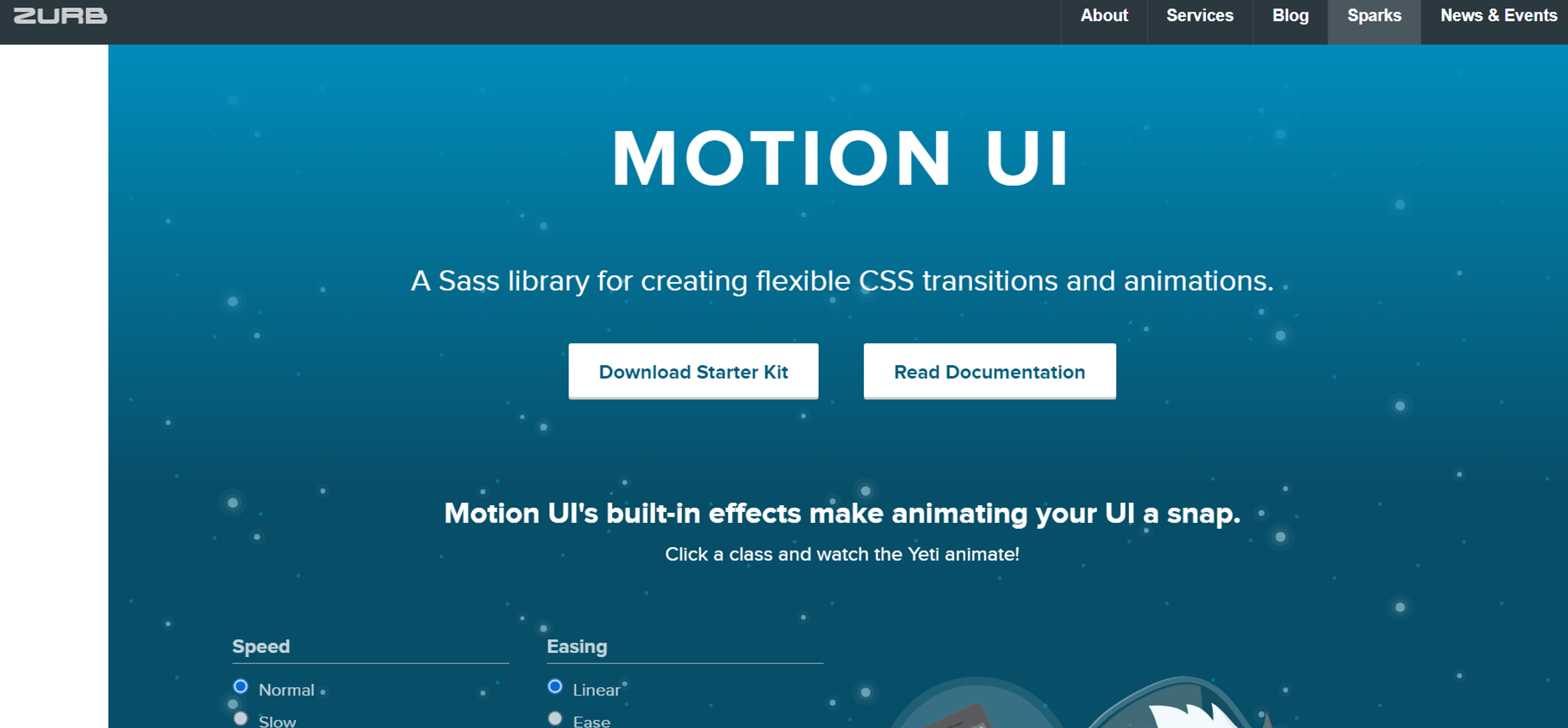
Motion UI works well for beginners. It provides over twenty pre-built transitions and effects. Designers can customize these or create original animations to fit specific design needs. The tool balances ease of use with flexibility.
Source: zurb.com
Figma includes Smart Animate for quick prototyping. It handles hover states, modals, and page transitions smoothly. While not as powerful as specialized motion tools, Figma excels at collaboration and iteration. Teams can preview animations directly in the design file.
After Effects serves professional motion designers, creating high-quality animations for transitions, icons, splash screens, and microinteractions. The learning curve is steep, but the control is unmatched. Export options like Lottie bring After Effects animations into web and mobile products. Designers can also export video files to showcase animation effects in presentations or product demos.
GSAP gives developers powerful JavaScript animation capabilities. It handles complex timelines and interactions that CSS can't achieve. Many award-winning websites use GSAP for smooth, performant animations.
These tools help teams create engaging interfaces that guide users through digital experiences. Including videos to demonstrate animation effects showcases motion and improves accessibility for users with disabilities.
FAQ
What Is UI Animation?
UI animation adds motion to interfaces, including transitions, microinteractions, and feedback. It makes digital experiences smoother and more intuitive.
What Does UI Animation Mean?
It uses movement and timing to guide attention, show change, and confirm user actions. It bridges design and interaction to improve usability and delight.
What Are the 4 Types of Animation in UI?
The main types are transitions, microinteractions, loading animations, and feedback motion. Each supports clarity, engagement, and system communication.
What Does UI Stand For?
UI stands for User Interface, the layout, visuals, and interactive elements that users engage with in apps, websites, and digital products.
Read more:
Conclusion
UI animation succeeds when it serves users first. Every movement should clarify, guide, or enhance rather than decorate. The best animation disappears into the experience, and users don't notice it consciously but feel its effects. Subtle animations provide an immersive experience through smooth transitions and visual feedback that draws users into the interface.
Balance matters most. Too little animation leaves interfaces static and unresponsive, while too much creates confusion and distraction. The right amount makes interactions feel natural and effortless, supporting user progress through the interface.


About Clay
Clay is a UI/UX design & branding agency in San Francisco. We team up with startups and leading brands to create transformative digital experience. Clients: Facebook, Slack, Google, Amazon, Credit Karma, Zenefits, etc.
Learn moreAbout Clay
Clay is a UI/UX design & branding agency in San Francisco. We team up with startups and leading brands to create transformative digital experience. Clients: Facebook, Slack, Google, Amazon, Credit Karma, Zenefits, etc.
Learn more