


Artificial intelligence is becoming part of how modern UX teams research users, generate ideas, test flows, build interfaces, and improve digital products at scale. For design leaders, product teams, and founders, the real question is no longer whether AI belongs in UX. It is about how to use it well without sacrificing quality, trust, or human judgment.
That distinction matters.
Some of the most interesting agencies in the space are not just using AI tools. They are rethinking the design process around AI from the ground up, while keeping expert human judgment at the center:
What AI in UX Design Actually Means
AI in UX design refers to the use of machine learning, large language models, predictive systems, and automation tools to support user experience work across the design lifecycle.
That includes:
- Analyzing user interviews and survey data
- Generating wireframes, content, and design directions
- Personalizing product experiences
- Automating repetitive design tasks
- Predicting user behavior and friction points
- Supporting usability testing and optimization
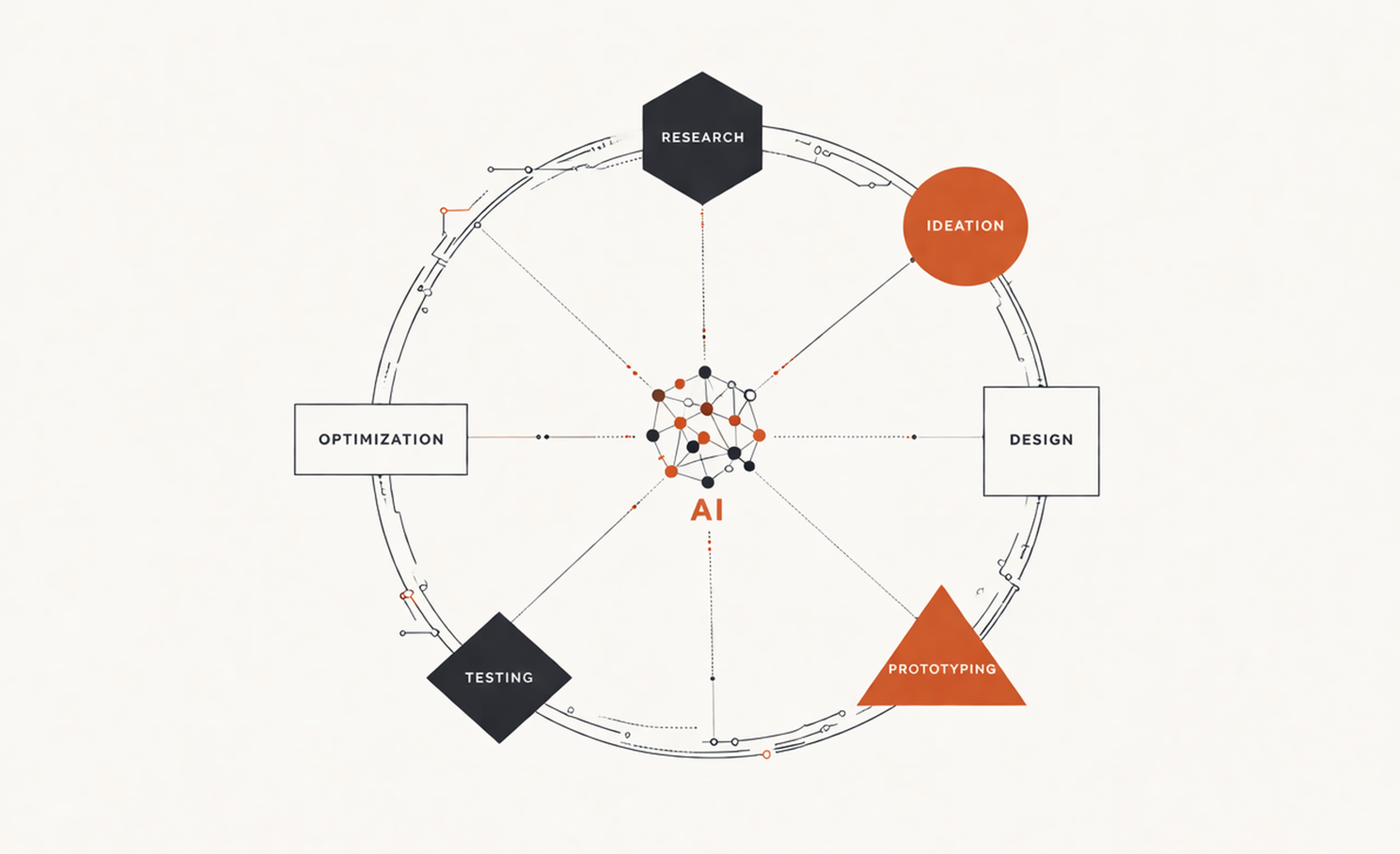
The important point is that AI is not a single tool or feature. It is a layer of capability that can be applied across research, strategy, content, UI design, and product optimization.
This is why the industry is changing so quickly. AI does not only affect one stage of design. It affects the entire system.
AI-UX Design Lifecycle
Why AI Is Reshaping UX Now
Several forces are pushing AI deeper into UX workflows.
First, digital products are more complex than ever. Teams manage multi-device journeys, growing feature sets, global audiences, and constant release cycles. Manual design processes alone cannot keep up with the volume of decisions.
Second, product teams are expected to deliver faster. Designers are under pressure to validate ideas quickly, reduce rework, and show business impact. AI helps compress discovery and production time.
Third, user expectations are rising. People now expect products to feel relevant, intuitive, and responsive to their context. Personalization, predictive guidance, and smarter interfaces are becoming normal. AI makes those experiences more feasible.
In AI-driven financial products such as Streetbeat, the challenge for us was not just showing data. It was mainly to translate model-based insights into interfaces that feel clear, responsible, and trustworthy.
When a system suggests an action or insight, users need context, controls, and a way to verify or challenge the output. In high-stakes environments, the UX must also communicate uncertainty carefully rather than overstate confidence.
Streetbeat AI-Powered Platform Designed by Clay
Finally, the tooling has matured. What used to require specialized data science support is now increasingly accessible inside mainstream design, research, and product tools.
The result is not the replacement of UX design. It is the expansion of what UX teams can do.
How AI Improves UX Research
Research is one of the clearest areas where AI adds value.
UX researchers and product designers often spend enormous amounts of time transcribing interviews, tagging notes, clustering patterns, and summarizing findings. AI can significantly reduce that operational load. It can:
- process interview transcripts
- detect recurring themes
- group sentiment patterns
- highlight quotes tied to specific usability issues
This changes the speed of insight generation.
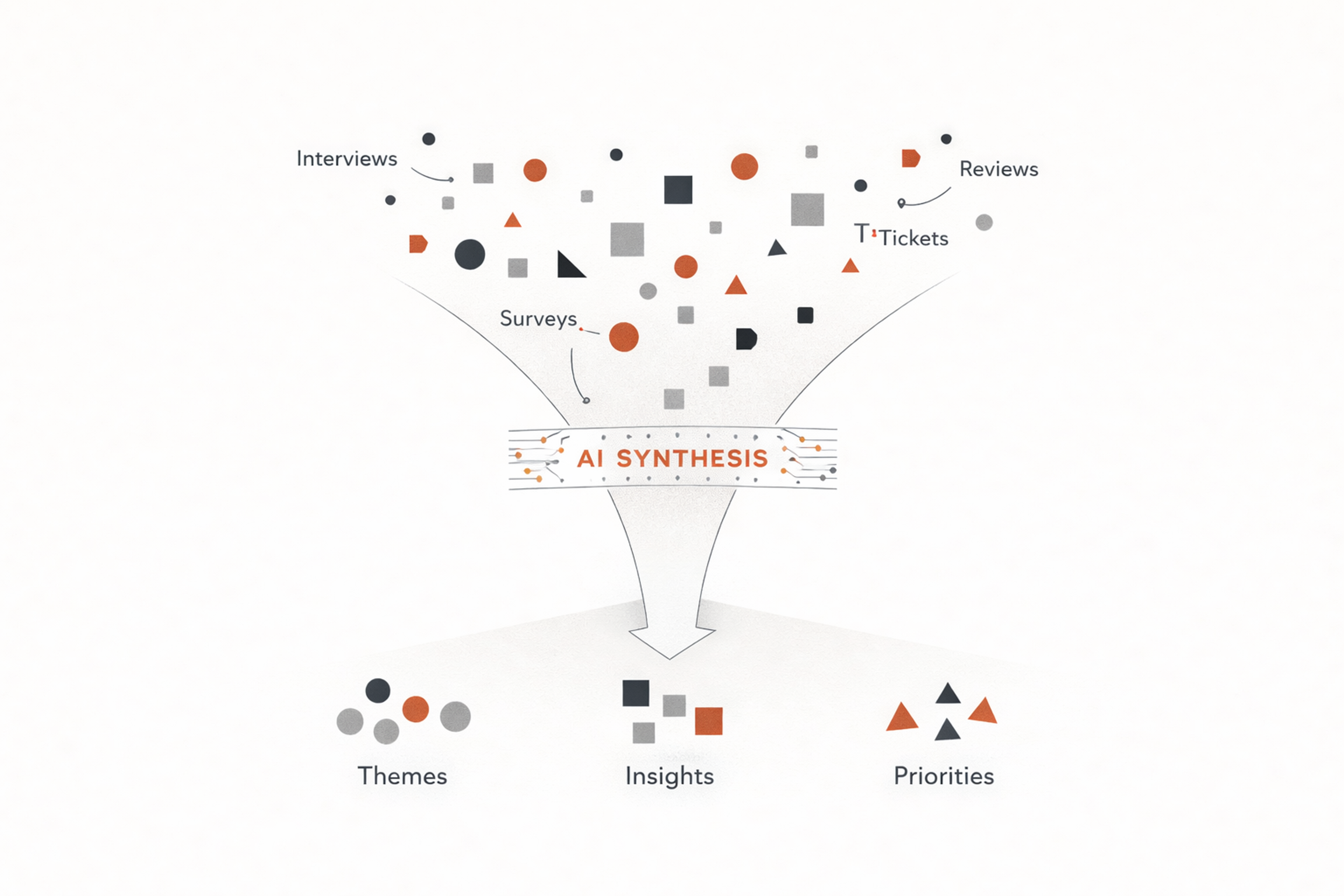
Instead of waiting days or weeks for synthesis, teams can move from raw conversations to structured themes much faster. That is especially useful when dealing with large studies, multiple markets, or continuous feedback streams from support tickets, app reviews, surveys, and session recordings.
Still, this is where expert oversight matters most. AI can identify patterns, but it does not always understand nuance, context, or what is strategically important. It may overemphasize repeated complaints while missing subtle but high-impact signals. It may summarize what users said without clarifying what they actually need.
The best teams use AI to accelerate synthesis, then apply human interpretation to determine meaning, priority, and action.
UX Research Acceleration Funnel
How AI Is Changing Ideation and Concept Development
AI also changes how teams explore design directions.
During ideation, designers can use AI to generate alternative flows, feature concepts, content structures, onboarding sequences, and edge case scenarios. This can be useful early in discovery, especially when teams want to widen the solution space before narrowing it.
That does not mean accepting machine-generated ideas at face value. It means using AI as a structured brainstorming partner.
For example, a designer working on a fintech onboarding flow might ask an AI system to propose multiple ways to reduce anxiety during identity verification.
Another team designing a healthcare portal might use AI to generate accessibility-focused content patterns for complex form steps. In both cases, the value is not in copying the output directly. The value is in surfacing possibilities faster.
This is a major shift for the industry. Ideation used to depend heavily on individual experience, team workshops, and existing references. Now, teams can generate broader option sets quickly, then evaluate them through product, brand, and usability lenses.
AI in Wireframing, UI Design, and Prototyping
One of the most visible changes in UX is the way AI supports interface creation.
AI-assisted design tools can now generate screens from text prompts, create layout variations, suggest component groupings, produce placeholder copy, and even turn rough product requirements into early wireframes.
For teams under tight timelines, this can reduce blank-page friction and speed up early-stage exploration.
This is particularly helpful when:
- Translating product requirements into interface directions
- Creating low-fidelity concepts for review
- Producing variations for different user scenarios
- Generating copy drafts for buttons, empty states, and onboarding
The strongest use case is not full automation. It is acceleration.
Creating multiple versions of a screen becomes easier, which helps teams test hypotheses around:
- information hierarchy
- layout direction
- content emphasis
- interaction patterns
AI can also help draft microcopy for:
- empty states
- tooltips
- onboarding prompts
- error messages
Experienced designers still need to refine hierarchy, interaction logic, accessibility, and visual consistency. AI can assemble interfaces quickly, but it often produces generic patterns, weak spacing decisions, inconsistent states, or layouts that look plausible but fail in real use.
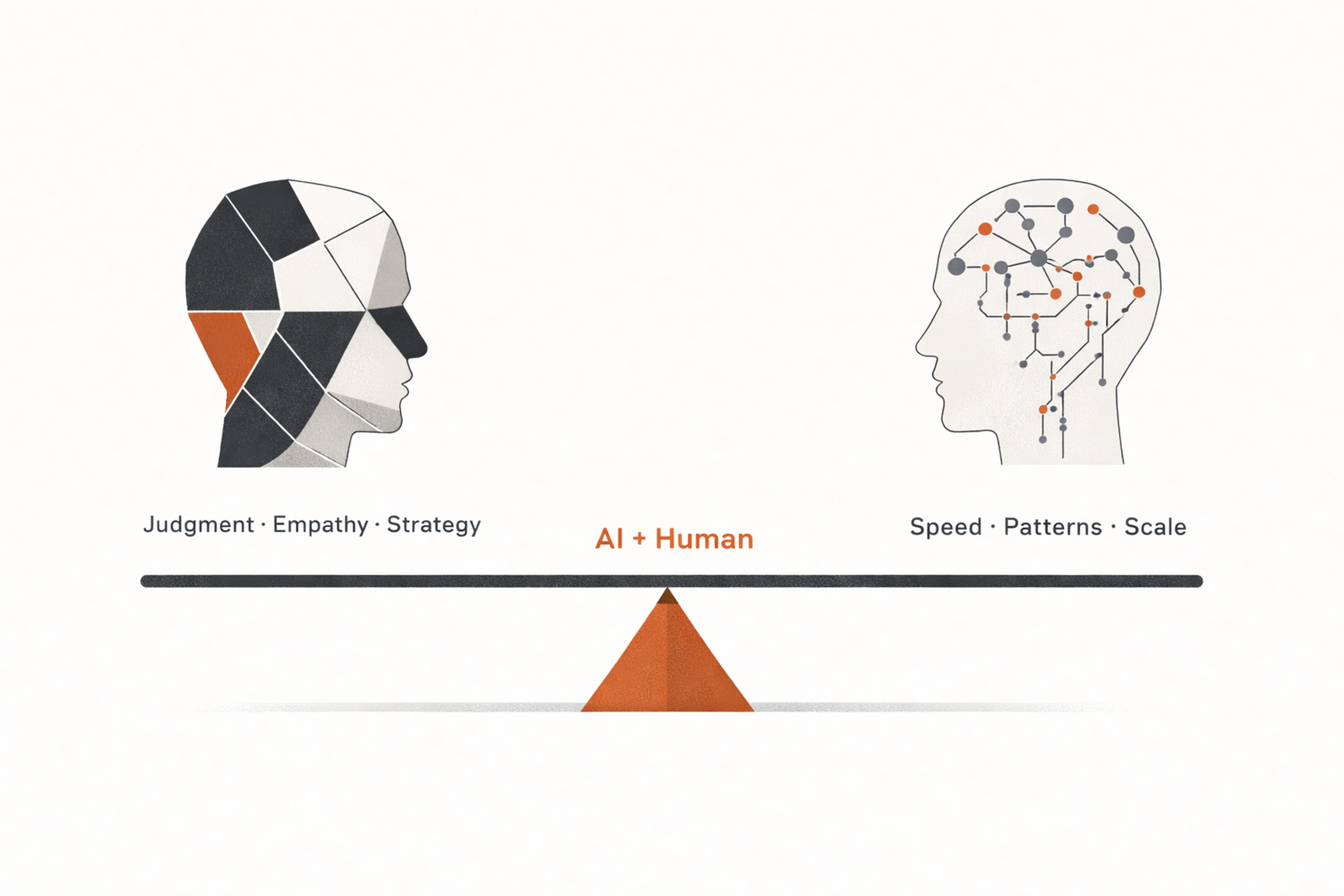
That means the designer’s role becomes more editorial and strategic. Instead of drawing everything from scratch, they increasingly direct, evaluate, correct, and improve machine-assisted output.
Human and AI Balance
Personalization Is Becoming a Core UX Capability
AI is also transforming the experience users see after launch.
Traditional personalization was often limited to simple rules. Show this message to new users. Recommend this feature to users in this segment. AI makes personalization more adaptive and behavior-driven.
Products can now tailor onboarding paths, content recommendations, search results, support prompts, and interface guidance based on usage patterns, goals, and intent signals. In the right contexts, this can make products feel more useful and less overwhelming.
For UX teams, that creates both opportunity and responsibility.
The opportunity is clear. Better personalization can reduce friction, improve retention, and help users get value faster.
The responsibility is just as important. Personalization must remain understandable, fair, and respectful of privacy. Users should not feel manipulated or confused by invisible logic. If an interface changes dynamically, it still needs to feel coherent and trustworthy.
The future of UX is not just adaptive. It must also be legible.
AI for Accessibility and Inclusive Design
AI has the potential to improve accessibility, but it should support accessibility work, not replace it.
It can help:
- generate alt text
- improve image descriptions
- support voice interactions
- reduce language barriers through translation
- suggest ways to adapt layouts for different user needs
- assist in identifying accessibility issues earlier in the design cycle
Still, automated accessibility support has limits.
A tool may flag missing labels or contrast issues, but it cannot fully understand lived experience. Real accessibility requires testing with real users, expert review, and thoughtful design decisions. AI can expand access, but it is not proof of inclusion on its own.
The best use of AI in accessibility is as an assistant that helps teams move faster and catch more issues, while human designers and specialists remain responsible for quality.
Conversational and Generative Interfaces
One of the biggest changes AI brings to UX is not just how teams work, but what interfaces look like.
Conversational UX allows users to express intent in natural language, through chat, voice, or hybrid interfaces. Designing these experiences requires more than friendly copy. Teams need to define boundaries, manage expectations, handle ambiguity, and provide graceful recovery when the system fails.
Good conversational UX is clear about what the system can and cannot do. It asks for clarification when needed, avoids fake certainty, and always gives users a safe next step.
Generative UX goes a step further. Instead of only retrieving information, the system creates outputs such as summaries, plans, recommendations, drafts, and assets. The design challenge becomes legibility and control.
Users need to know:
- what the system is generating
- why it produced that result
- how to steer it
- how to edit, undo, or reject it
A useful framework is to design for three AI states: when the model is likely right, when it is uncertain, and when it is wrong. Each state needs different UX patterns, such as confirmation, constraints, suggestions, or escalation to a human.
Data Privacy in AI-Driven UX
As AI becomes part of the product experience, privacy becomes a design responsibility, not just a legal one.
AI-powered experiences often rely on large amounts of behavioral, transactional, or contextual data. That can create better personalization and more relevant outputs, but it also raises serious concerns around consent, security, fairness, and transparency.
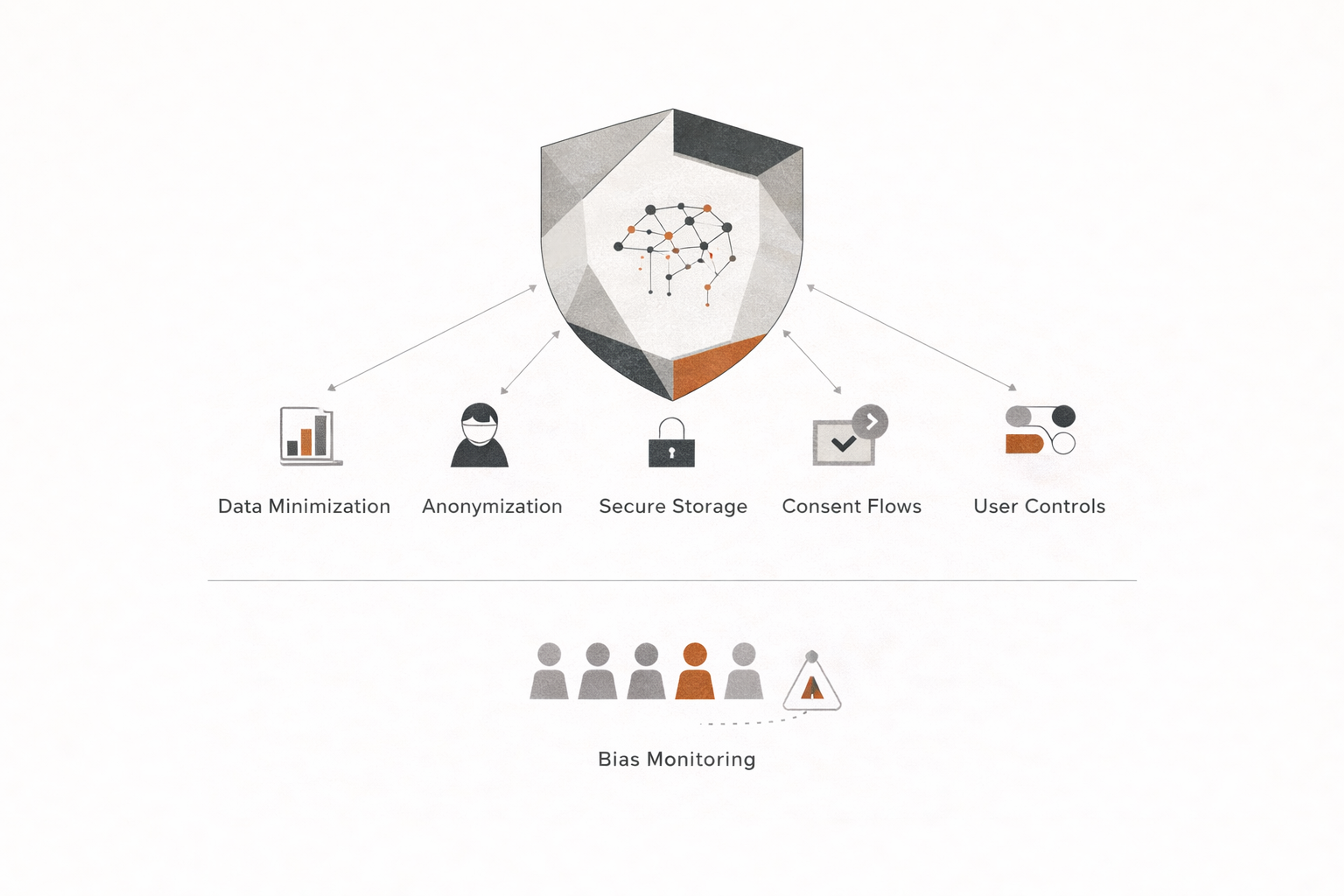
UX teams should build privacy into the experience from the beginning. That includes:
- data minimization
- anonymization where possible
- secure storage and transmission
- clear consent flows
- strong user controls
People should be able to understand what data is collected, how it is used, and what choices they have. Privacy settings should not be buried. They should be easy to find, easy to understand, and easy to manage.
Teams also need to monitor for bias and unintended outcomes. A model that performs well on average can still create unfair experiences for certain groups. Responsible UX means watching for that drift and correcting it.
Data Privacy in AI-Driven UX
AI Supports Faster Testing and Optimization
Usability testing and conversion optimization are also becoming more data-driven thanks to AI.
Teams can use AI to identify drop-off points, summarize open-ended feedback, detect repeated behavioral issues across recordings, and suggest areas worth testing. Instead of reviewing every signal manually, product teams can prioritize likely friction points faster.
This does not eliminate direct observation. It strengthens it.
The best usability work still comes from watching real people attempt real tasks and understanding why they hesitate, fail, or succeed. AI can help identify patterns more quickly, but it should not replace evidence gathered from actual users.
Where AI becomes especially useful is in continuous optimization. Once a product is live, teams can combine behavioral data, support conversations, and qualitative feedback to detect recurring pain points earlier. That makes UX less reactive and more proactive.
The UX Designer’s Role Is Evolving, Not Disappearing
There is a lot of shallow discussion around AI replacing designers. In reality, AI is changing the role more than removing it.
Low-value production work will continue to shrink. Manual tagging, repetitive wireframe drafting, and first-pass content generation are increasingly automatable. But high-value design judgment is becoming more important, not less.
Teams still need people who can:
- Frame the right problem
- Interpret human behavior accurately
- Balance business goals with user needs
- Design systems that feel coherent and trustworthy
- Make ethical decisions about automation and personalization
- Turn raw insight into strong product direction
In other words, AI raises the premium on strategic UX thinking.
The Evolving UX Designer Role
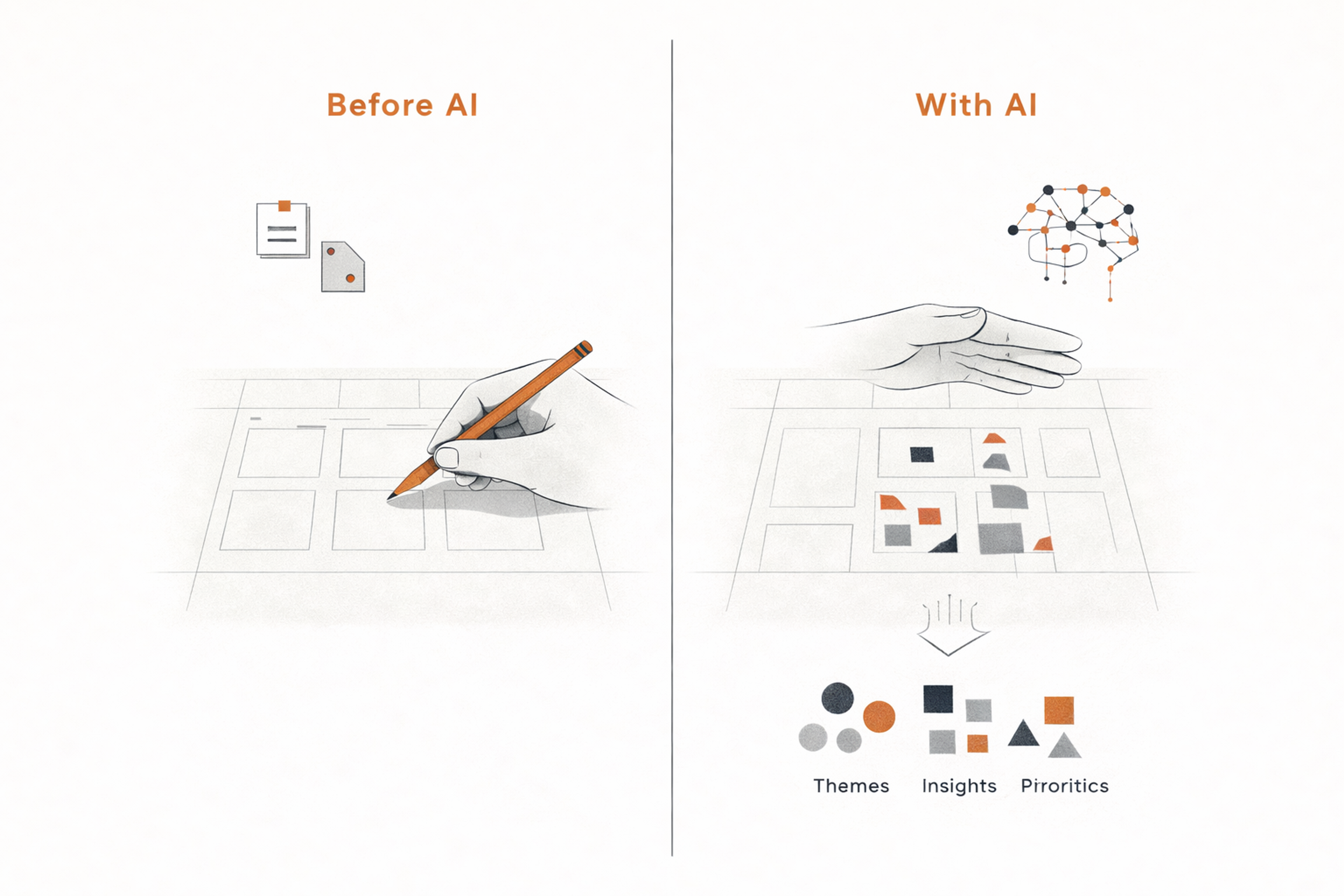
Designers who only execute screens may feel more pressure. Designers who can connect research, product logic, user psychology, and business value will become more valuable.
Risks and Limitations Teams Cannot Ignore
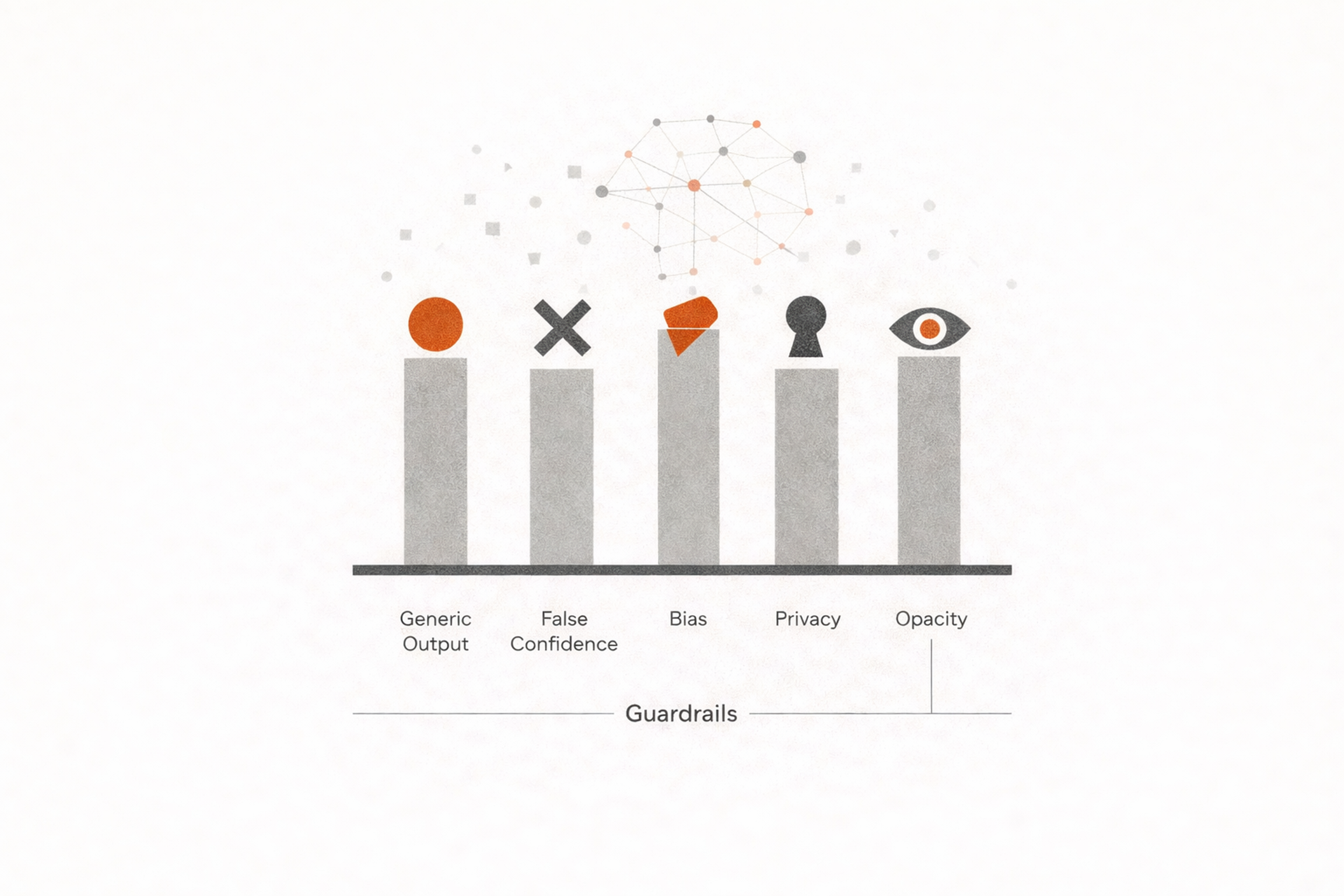
AI in UX design is powerful, but it is not neutral and not automatically safe.
One major risk is generic output. AI often produces patterns based on the average of what already exists. That can flatten originality and weaken product differentiation.
Another risk is false confidence. AI-generated recommendations can sound polished while being shallow, wrong, or unsupported by real user evidence. Teams that rely on them uncritically may move faster in the wrong direction.
Bias is also a serious concern. If systems are trained on incomplete or biased data, they can reinforce exclusion, stereotyping, and uneven experiences across different user groups.
Then there is privacy. Many AI workflows depend on large amounts of user data. Teams must be careful about what they input, what vendors process, and how they protect sensitive information.
Finally, there is the trust problem. If products become too opaque, users may not understand why a system recommends something, changes a flow, or blocks an action. Poorly explained intelligence can damage confidence quickly.
Risks and Guardrails
What the Future of UX Design Looks Like
The future of UX design will likely be defined by a combination of human judgment, system intelligence, and continuous adaptation.
Design workflows will become more conversational. Researchers and designers will increasingly work with tools that can summarize, suggest, generate, and simulate. Interfaces themselves will also change. More products will become dynamic, predictive, and responsive to user intent.
But the winning products will not be the ones that use the most AI. They will be the ones who use AI in ways that feel genuinely helpful.
That means the core goals of UX stay the same. Clarity still matters. Trust still matters. Accessibility still matters. People still need products that reduce effort, support goals, and make sense in context.
AI changes the methods. It does not replace the mission.
Best Practices for Using AI in UX Design
Teams that get the most value from AI usually follow a few practical principles.
1.
Start with workflow pain points, not hype. Use AI where it removes friction, saves time, or improves insight quality.2.
Keep humans in the loop. AI should support decisions, not make critical UX choices without review.3.
Use real user evidence as the standard. Generated output is not validated.4.
Protect trust. Make personalization and automation understandable whenever possible.5.
Design for edge cases. AI systems often perform well on typical cases and poorly on unusual but important ones.6.
Document decisions. When AI influences research synthesis, content, or interface logic, teams should know how and where it was used.7.
Measure outcomes. Track whether AI-assisted design decisions improve usability, adoption, retention, or task success.
Best Practices Checklist
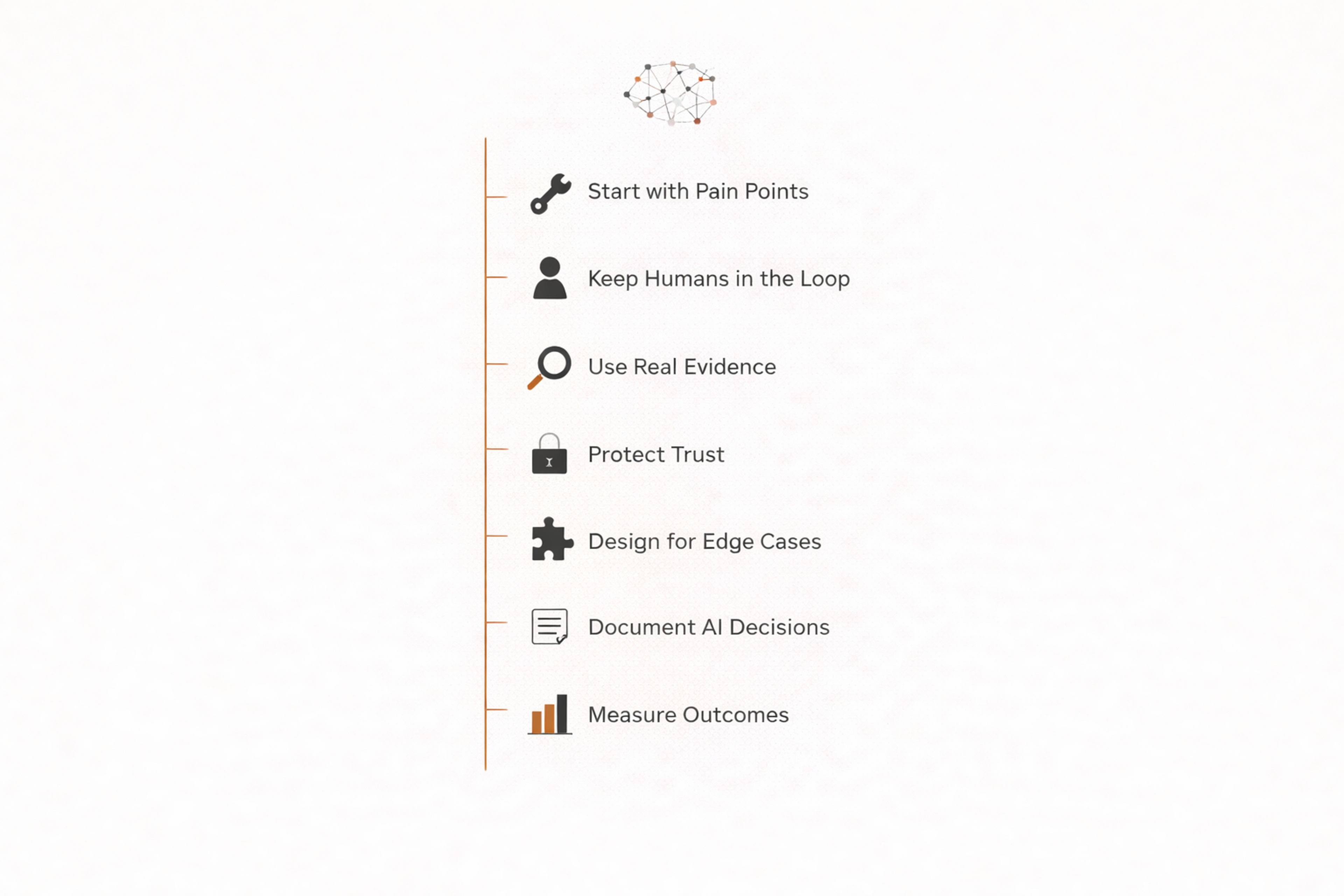
These principles keep AI useful instead of performative.
FAQs
What is AI in UX design?
AI in UX design is the use of artificial intelligence tools and systems to support user research, ideation, prototyping, personalization, usability analysis, and product optimization.
Is AI replacing UX designers?
No. AI is automating some repetitive tasks, but strong UX still depends on human judgment, research interpretation, strategy, empathy, and ethical decision-making.
How does AI help UX research?
AI can transcribe interviews, summarize findings, cluster feedback themes, analyze surveys, and surface patterns from large datasets much faster than manual methods alone.
Can AI create wireframes and UI designs?
Yes. AI can generate early wireframes, layouts, copy drafts, and design variations. However, designers still need to refine usability, hierarchy, accessibility, and brand consistency.
What are the biggest benefits of AI in UX design?
The main benefits are faster workflows, quicker synthesis of research, better personalization, more design variations, and faster identification of usability issues.
What are the risks of using AI in UX?
Key risks include biased output, generic design patterns, privacy concerns, poor recommendations, over-reliance on automation, and reduced transparency for users.
How does AI improve personalization in UX?
AI helps tailor content, onboarding, recommendations, and support based on user behavior, intent, and context, which can reduce friction and improve relevance.
Is AI-generated UX content reliable?
It can be useful for first drafts, but it should always be reviewed. AI-generated copy and design suggestions can sound strong while missing context or usability nuance.
How should UX teams start using AI?
Start with high-friction workflows such as research synthesis, content drafting, pattern exploration, or usability analysis. Focus on practical gains instead of broad automation.
Does AI make products more user-friendly by default?
No. AI can support better experiences, but only when it is guided by real user needs, careful design decisions, and strong validation.
What skills do UX designers need in an AI-driven industry?
Designers need stronger skills in problem framing, research interpretation, prompt thinking, systems design, content evaluation, ethics, and cross-functional decision-making.
Can AI improve usability testing?
Yes. AI can help summarize test sessions, detect recurring issues, and prioritize problem areas. But direct observation of real users is still essential.
What industries benefit most from AI in UX design?
AI is especially useful in SaaS, fintech, healthcare, ecommerce, education, and enterprise software, where products are complex, and user journeys generate large amounts of data.
How does AI affect accessibility in UX design?
AI can help identify accessibility issues, generate alternative content, and scale audits. But accessibility still requires expert review and testing with real assistive technology contexts.
What is the future of AI in UX design?
The future points toward more adaptive interfaces, faster research workflows, deeper personalization, and more collaborative design systems where AI supports, rather than replaces, human expertise.
Final Thoughts
AI in UX design is transforming the industry by changing how teams research, create, test, and optimize digital experiences. It helps teams move faster, process more information, and personalize products more effectively. At the same time, it raises the bar for judgment, ethics, and design leadership.
The most important takeaway is simple. AI is not a shortcut to great UX. It is a force multiplier for teams that already understand users, define problems clearly, and make intentional decisions.


About Clay
Clay is a UI/UX design & branding agency in San Francisco. We team up with startups and leading brands to create transformative digital experience. Clients: Facebook, Slack, Google, Amazon, Credit Karma, Zenefits, etc.
Learn moreAbout Clay
Clay is a UI/UX design & branding agency in San Francisco. We team up with startups and leading brands to create transformative digital experience. Clients: Facebook, Slack, Google, Amazon, Credit Karma, Zenefits, etc.
Learn more

